Google Chrome has announced one of the biggest updates to Chrome for Android in some time, giving tablets a much needed overhaul of the web browser.
In a blog post, Google laid out a weighty emphasis on tab management in its latest browser revision, which is welcome news for many business and pro users, especially in anticipation of the company’s upcoming Pixel Tablet, which is set to arrive next year.
When tabs become too small because there are so many open, for example, the close button is set to disappear to prevent accidental losses. There’s also a “one-step restore” in place to retrieve an accidentally closed tab.
Chrome for Android updates
It seems that Google has also taken a leaf out of Apple’s book by offering an alternative to the horizontal tab bar, which it calls the visual tab grid. Here, users can see previews of tabs to help them navigate more easily.
Another feature we’ve seen on Apple devices, as well as Chrome for the desktop, is tab grouping. This is set to come to tablets “soon”, however it did not make it to the most recent release of Chrome for Android tablets.
Elsewhere, enhancements have been made to productivity in Chrome on Android tablet devices. Drag-and-drop is now supported from Chrome to apps like Keep and Docs, which allows users to pull data like images, text, and links straight from the browser.
Finally, a new desktop view can be enabled by default, which requests desktop versions of websites rather than mobile-friendly interfaces. In many cases, this can open up a fuller version of a site with more menus and buttons.
This latest version of Chrome is available now to download on all compatible tablets running Android.
A “fully undetectable” backdoor has been brought to light thanks to the malware operators’ reckless behavior.
Cybersecurity researchers from SafeBreach Labs claim to have detected a brand new PowerShell backdoor which, when executed properly, gives attackers remote access to compromised endpoints. From there, the attackers could launch all kinds of stage-two attacks, from infostealers, to ransomware, and everything in-between.
According to the report, an unknown threat actor created a weaponized Word document, called “ApplyForm[.]docm”. It carried a macro which, if activated, launched an unknown PowerShell script.
Dropping the ball with scripts
“The macro drops updater.vbs, creates a scheduled task pretending to be part of a Windows update, which will execute the updater.vbs script from a fake update folder under ‘%appdata%localMicrosoftWindows,” the researchers explained.
Updater.vbs would then run a PowerShell script that would give the attacker remote access.
Before running the scheduled task, the malware generates two PowerShell scripts – Script.ps1 and Temp.ps1. The contents are hidden and placed in text boxes inside the Word file, which is then saved in the fake update directory. That way, antivirus solutions fail to identify the file as malicious.
Script.ps1 reaches out to the command & control server to assign a victim ID, and to receive further instructions. Then, it runs the Temp.ps1 script, which stores information, and runs the commands.
The mistake the attackers made was issuing victim IDs in a predictable sequence, allowing researchers to listen in on the conversations with the C2 server.
While who’s behind the attack remains a mystery, the malicious Word document was uploaded from Jordan in late August this year, and has compromised approximately one hundred devices so far, usually belonging to people looking for new employment opportunities.
One reader of The Register described their experience with the backdoor, offering advice to enterprises looking to mitigate the damage that unknown backdoors can cause.
“I run an MSP and we were alerted to this on the 3rd of October. Client was a 330 seat charity and I did not link it to this specific article until I read it this morning.”
“They have zero-trust [ZT] and Ringfencing so although the macro ran, it didn’t make it outside of Excel,” they said. “A subtle reminder to incorporate a ZT solution in critical environments as it can stop zero-day stuff like this.”
Netflix has introduced a new feature that allows users to transfer profiles to a separate account. This is especially useful if you have any password moochers, or if you have somebody using your account that you don’t want on there anymore.
If you’d like to know how to transfer profiles on Netflix, then keep on reading. You can also check out everything we know about the brand new Netflix Basic with Ads tier which is being introduced this November.
How to transfer profiles on Netflix
Netflix is rolling out this feature now across the world, and it should be available to most users in the US and UK. You must – not via an app. Here are the steps you need to take to transfer a profile:
How to transfer a profile in Netflix
At a glance
Time to complete: 5 minutes
Materials required: PC or laptop, Netflix account
1.
Click on ‘Transfer Profile’ on the drop-down menu on the homepage
Netflix
Clicking on ‘Account’ can also take you to the transfer profiles page
2.
Confirm that you want to allow profile transfers
Hannah Cowton / Foundry
An email will be sent to the account holder to confirm that profile transfers are turned on once you click ‘Allow’
3.
Select which profile you would like to transfer to a new account within the Profiles and Parental Controls section, and then click ‘Transfer’
Netflix
As per the screenshot, a backup copy of the profile will still be available on the original account
4.
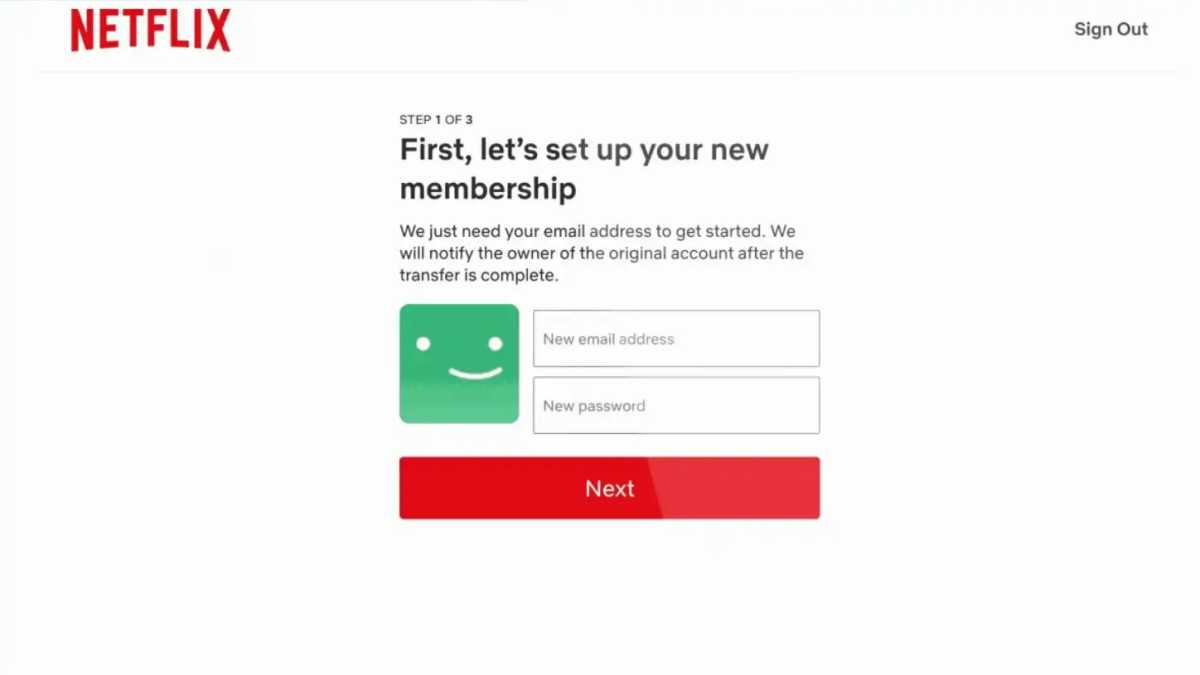
Enter the email address and password that you would like to use for the new account
Netflix
Follow the on-screen prompts until the profile is moved over – Netflix will send a confirmation email once everything is finished
Note that Netflix will keep a copy of the profile on the original account. At the time of writing, you cannot move a profile to an existing account – it will have to be a new one.
If you must leave the process halfway through, you can continue by using a web browser to sign into Netflix with the email address and password you used to start the process. Then, simply select ‘Finish Transfer’ to pick up where you left off.
This is the first thing that Netflix has rolled out to curb password sharing. The platform has been testing allowing users to add additional ‘Homes’ in Central and South America, as well as other features – but these aren’t yet official worldwide.
What is carried over in a profile transfer on Netflix?
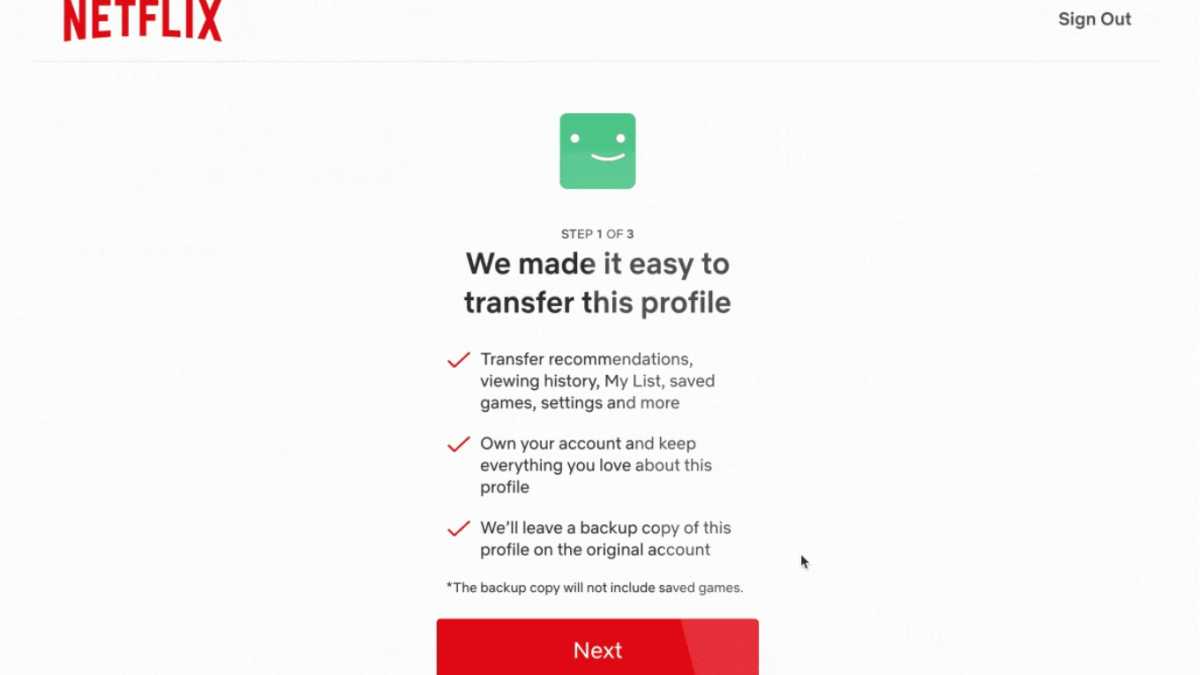
When you move a profile to a new account, the following information should be retained:
Recommendations and content suggestions
Viewing history
Saved games and games handle
Settings such as languages and subtitles, autoplay, age-rating viewing restrictions and more
Off the back of new entry-level iPads and iPad Pros being released on October 18, non-US markets have seen a significant price increase for the existing iPad mini models on Apple’s website.
In the UK the 64GB iPad Mini is now listed at £569, up from £479, while the 256GB model now costs £749 from £619. All in all that’s a 19%-21% increase, which is no small amount. Similar price hikes can be seen across the EU market, and no explicit reason for this has been given by Apple as of yet.
Raising the prices of the existing iPad models to make the newer versions appear more budget-friendly is bad news for non-US consumers and not particularly consumer-friendly in general. The same thing happened not too long ago with the iPhone SE when the iPhone 14 was released, though at a smaller scale in comparison.
There seems to be a pattern emerging here, with Apple dropping new products on us with heavier and heavier price tags. In our review of this year’s M2 MacBook Air, we made a note of the startling new asking price for the MacBook Air compared to the MacBook Air M1 when it launched in 2020. It will be interesting to see if this trend will continue across new launches and products in the future and if we should get accustomed to dreading a new product dropping with the suspicion that its predecessors will become more expensive.
The scary thought creeps in and we have to wonder: will MacBooks and iPads continue to go up in price from here on out, and by how much each time? With rumors flying around that we might be getting a new fleet of MacBooks any day now, this costly consistency does not bode well for those of us itching to get a new MacBook anytime soon.
Analysis: If you want a cheap Apple device, wait until Black Friday
If MacBooks are indeed getting more expensive – does it make sense to buy one now? With Black Friday approaching, there’s a good chance that we’ll see prices drop for existing MacBooks. A cheap MacBook is a relative thing – they’re not inexpensive laptops at the best of times – but now more than ever are you likely to find the best MacBook for you at a less painful price.
In fact, if Apple does indeed announce new laptops, perhaps followups to the MacBook Pro 14-inch and MacBook Pro 16-inch, Black Friday could be a superb time to get the older models, as retailers clear stock ahead of the newer versions going on sale.
Buying a new MacBook or any big tech purchase so close to Black Friday is risky, as you don’t want to risk buying something that ends up getting a price cut a few weeks later. We have a feeling there will be plenty of Black Friday MacBook deals later this year – so more expensive iPads might not be the awful news you might have expected.
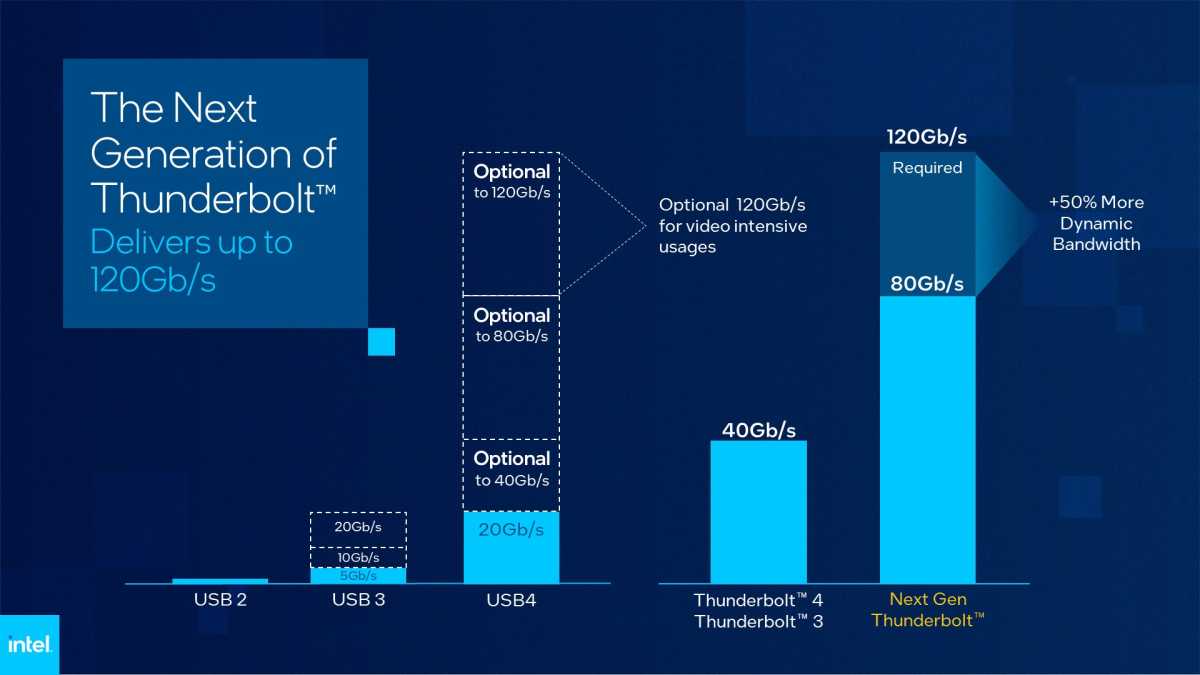
Just a few weeks after USB4 version 2.0 was announced, Intel has returned fire with its own 80Gbps I/O standard, what it’s calling “the next generation of Thunderbolt” for docking stations and other devices.
What will likely be called Thunderbolt 5 has its own quirk: in certain situations, specifically transmitting high-definition video, the available channels can be re-allocated to allow from 80Gbps to up to 120Gbps of available bandwidth. But Intel isn’t revealing when the next-gen Thunderbolt technology will roll out, or what it will be officially called.
What we do know, however, is that several major I/O standards are aligning for the future. USB4v2, whose standard was finalized on Tuesday, will allow its own 80Gbps connections and forms the foundation for the next-gen Thunderbolt spec. DisplayPort, one of the video protocols that can run over Thunderbolt, also received a more restrictive DisplayPort 2.1 specification that will help better ensure interoperability with cables and components.
Historically, a desktop or laptop PC connected to various peripherals through separate cables. You’d use a HDMI or DisplayPort cable for a display or two, and a USB cable to storage devices, mice and keyboards. All of these required their own ports on a laptop or PC. Thunderbolt simplifies a PC’s design, eliminating all of these ports for a “one cable fits all” solution. To be fair, Thunderbolt essentially requires consumers to buy a separate Thunderbolt docking station to connect to various legacy devices. On the other hand, a variety of docks allow consumers to buy exactly what they need.
How Thunderbolt compares to USB4 version 2, according to Intel.
Intel
It also appears as if USB4v2 and the next-gen Thunderbolt specification will share a common protocol and physical-layer chip, so you’ll be able to buy a hybrid Thunderbolt-USB4 dock.
What Intel’s announcement brings with it is even more flexibility. Future Thunderbolt ports on your laptop will run at essentially double the speed that they do now while remaining backwards-compatible with earlier Thunderbolt generations. Thunderbolt docks — many of which support USB4 as well — will essentially double in speed, too. Consumers will be able to attach more devices to those docks, or use devices that run at higher speeds or higher refresh rates. (Mice, keyboards, printers, and external hard drives require just a small fraction of the available bandwidth Thunderbolt provides, and they’ll work just fine.)
What next-gen Thunderbolt will do for your PC
The latter point is the most important. Today, Thunderbolt docks are usually associated with their ability to connect a pair of 4K, 60Hz displays for increased productivity. Next-gen Thunderbolt, or Thunderbolt 5, will benefit gamers: Jason Ziller, general manager of the Client Connectivity Division at Intel, said that the spec will allow for either a single 4K display running at 240Hz, or a 1440p display (2K) display at an eye-watering 480Hz, preferred by PC gamers who prefer high refresh rates. HDR data capabilities will also be increased to 10 bits, Ziller said, while still maintaining bandwidth for data.
Connecting two 4K displays to Thunderbolt requires about 34Gbps, which can almost consume all of the bandwidth that today’s Thunderbolt 3/4 docks provide — if you connect a high-performance SSD to the system, you may not be able to achieve its full performance. (Thunderbolt assigns priority to the display protocols, so that your monitors always work as expected, Ziller said.) Next-gen Thunderbolt will simply add more overhead, in terms of data.
External GPUs will also be directly connected to next-gen Thunderbolt docks or Thunderbolt 5, Ziller said, using a standard four lanes of PCI Express.
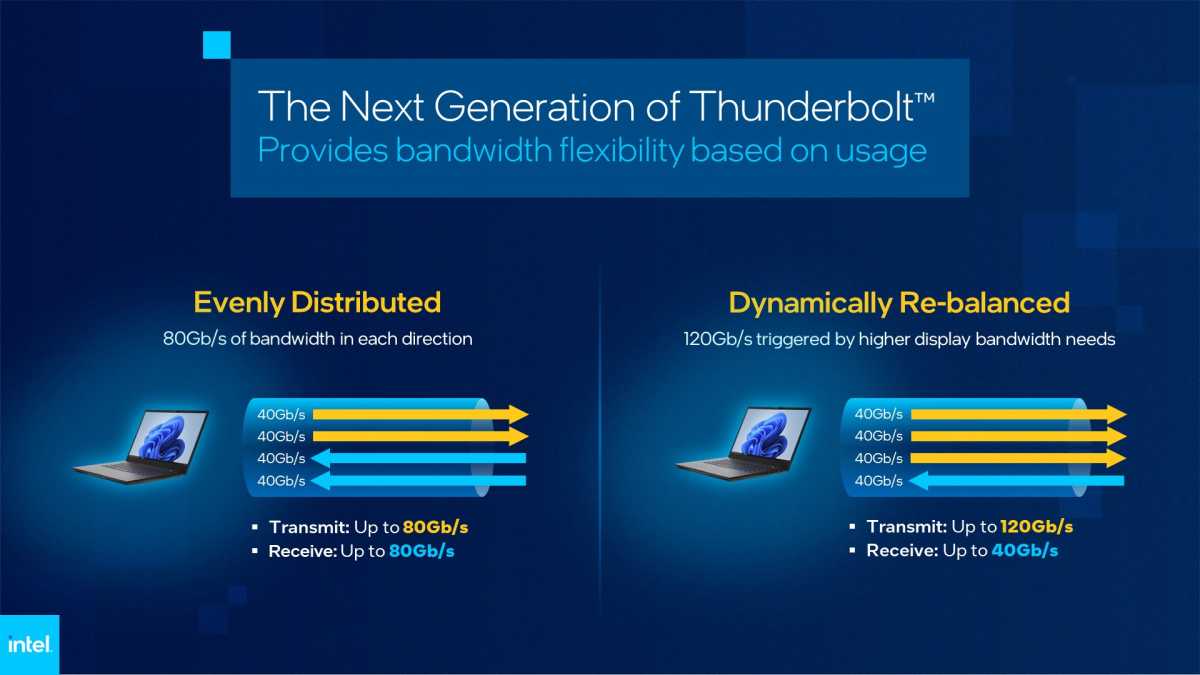
Next-generation Thunderbolt will be able to re-balance itself according to bandwidth demands.
Intel
That’s where the next-gen Thunderbolt technology gets interesting. Inside, four channels supplying 80Gbps of data throughput in either direction (two channels of 20Gbps apiece, one set for receiving and another for sending data) will be able to be reconfigured at need. That will reconfigure the device where 80Gbps is used for sending and receiving data to one where 40Gbps is used to receive data, versus 120Gbps of bandwidth for transmitting data. It’s not quite clear, however, what will happen if excessive data is moving back and forth along the Thunderbolt bus.
That’s just one of the things we really don’t know about next-gen Thunderbolt at the point in time. For one, USB4v2 devices may be first to market. “We’re not really talking about timing of any products on this,” Ziller said. “We’re just in early phases of development right now. I think in the coming months, we’ll give some more details on some of that in the future.”
“Next-gen Thunderbolt” will use some of the same passive cables as today’s Thunderbolt 4 devices. The 1-meter passive cables will remain the same, but any cables over a meter long will need to be replaced with next-gen cables, Ziller said. “We’ll be talking more in the future on how that’s going to be done,” he added.
Finally, Ziller and Intel also aren’t saying how much power the next-gen Thunderbolt standard will be able to deliver. Still, Ziller did say that Thunderbolt “can” be aligned to the USB Power Delivery specifications– which, according to what manufacturers have said, can be up to 240 watts. That’s enough for some gaming notebooks.
We now know a little more about what Thunderbolt will offer next year. But as far as more critical questions are more concerned — the name, availability, and price — we’re still largely in the dark.
The iPad mini 6 is much better looking, more powerful and more versatile than its predecessor, and the portable nature will appeal to many – you just need to decide whether the price increase is worth it for your needs.
Price comparison from over 24,000 stores worldwide
Updated on 19 October 2022 to reflect a price hike in the UK.
The iPad mini has been a long-time favourite among fans, and after a period devoid of meaningful updates, the small-screen tablet has finally got the love and attention it deserves. Sporting a reinvigorated design similar to that of the rest of the premium iPad collection, and performance to match, the sixth-gen iPad mini is better looking and more capable than ever. The catch? There’s a new price tag to reflect the upgraded smarts on offer.
The question is, is the sixth-gen iPad mini worth the £569/$499 asking price? Keep reading to find out.
Design and accessories
Refreshed design similar to the iPad Air
Increased display size without an increased footprint
USB-C & Touch ID
Second-gen Apple Pencil support, but no Magic Keyboard
The iPad mini 6 is the redesign of Apple’s small-screen tablet that fans have been waiting for, bringing the design more in line with that of the iPad Air and iPad Pro range. In fact, it’s so similar to the iPad Air that it could’ve been called the iPad Air Mini if that wasn’t such a mouthful, sporting the same near bezel-free look, Touch ID-enabled Power button and more, though there are a few crucial differences. More on those in a bit.
The key design change is a larger display, jumping from 7.9in on the iPad mini 5 to 8.3in on the iPad mini 6, but thanks to the slimmer bezels, it measures in at a near identical 195.4 x 134.8 x 6.3mm. That means the iPad mini is just as dinky and portable as it was before, but with a much-improved display experience.
Combined with a weight of just 293g, it’s the only iPad that you can comfortably use one-handed. While I love the big display of the 458g iPad Air and 682g iPad Pro 12.9in, there’s something refreshing about having a one-handed tablet experience. Plus, the ability to carry it around in a large pocket is also a big win for portability.
The iPad mini is also available in a variety of new colours including Pink, Starlight, Space Grey and the Purple of our review unit. While it looks beautifully purple in Apple’s renders, the finish is more muted in real life, not looking that dissimilar to the Space Grey model in some lighting conditions. That said, the English Lavender folio case (sold separately) does help the colour pop.
Regardless of colour option, you’ll find stereo speakers at the top and bottom of the iPad mini, providing a stereo experience that’ll adjust depending on the orientation of the tablet with a surprising amount of power, accompanied by the Touch ID-enabled Power button and volume buttons on the top and a USB-C port on the bottom.
It’s the first time the volume buttons have appeared on the top of an iPad, and while it initially took a bit of adjustment, I now prefer the convenience of having all the buttons in one place.
Why move the volume buttons at all? It was to make way for second-gen Apple Pencil support, bringing the upgraded stylus experience to the small-screen tablet for the first time, including magnetic wireless charging. The small dimensions of the tablet meant that, unlike the iPad Air and its ample space at the side, the volume keys would get in the way of the Apple Pencil when docked.
The second-gen Apple Pencil is a joy to use on the iPad mini, whether you’re jotting down notes using Quick Notes while working on a project or cooking up your next creative vision in Procreate, with impressively low latency, accurate pressure and angle detection and a no-fuss charging system.
Though the new Apple Pencil experience is a welcome change for iPad mini users, it doesn’t get the equally-impressive Magic Keyboard experience despite the accessory being available for the iPad Air.
It’s down to a lack of Smart Connector on the rear of the iPad mini, meaning you’re relegated to standard iPad mini keyboards. That’s not necessarily a bad thing, with great third-party keyboard cases available, but it won’t provide the same premium experience as Apple’s official accessory.
Display
Best pixel density of any iPad
Bright, vivid colours are perfect for movie-watching
60Hz refresh rate limits the experience
Small display isn’t suited to split-screen multitasking
Packing a larger display with thinner bezels than its predecessor, the 8.3in LED IPS display of the sixth-gen iPad mini is phenomenal for a tablet of its size.
The visuals produced are vivid and crisp whether you’re catching up on Marvel’s What If? on Disney+ or doodling on Procreate, with respectable brightness that allows for outdoor use (albeit with reflections) – up to 518cd/m2 in benchmark tests.
Colours pop with impressive vibrancy, so much so that I almost forgot that it’s not actually an OLED or Mini-LED powering the experience, with only the not-quite-deep blacks giving the game away.
Still, it’s detailed. More detailed, in fact, than any other iPad in Apple’s product line – and that includes the iPad Pro – thanks to its miniature size.
The combination of an 8.3in display and an impressive 2266 x 1488 resolution provides a pixel density of 326ppi, far surpassing the 264ppi standard across the rest of the iPad collection, as well as smoking most of the Android competition too (yes the 179ppi Samsung Galaxy Tab A7 Lite, I’m looking at you). If you’re a self-confessed pixel-chaser, the high pixel density of the iPad mini 6 will likely appeal to you.
But while it’s sharper than its siblings, the small display does have its downsides; namely when it comes to multitasking.
Despite offering the same split-screen and floating window multitasking features as the rest of the iPad range (complete with new easier to use toggles in iPadOS 15), the smaller dimensions of the display mean that text can quickly become small, and icons become hard to tap. So while you can multitask on the iPad mini, the larger display of the iPad 10.2in, iPad Air or either iPad Pro would be better suited.
With such a premium display experience on offer from the iPad mini 6, it’s a shame that it doesn’t offer the 120Hz ProMotion display tech available on the iPad Pro range and recent iPhone 13 Pro models to complete the experience. It’s not a surprise – it’s not available on any iPad aside from the Pro range, as it’s very much a Pro feature in Apple’s eyes – but the enhanced refresh rate would’ve truly made the iPad mini display the one to beat in the small-size tablet market.
Features and performance
A15 Bionic provides flagship-level performance
Stellar performance when gaming and working
Improved Neural Engine provides new AI features including Live Text
iPadOS 15 provides the best tablet software experience
Optional 5G connectivity available
Despite its tiny size, there’s flagship-level performance on offer from the sixth-gen iPad mini. At its heart you’ll find the same A15 Bionic chipset as the iPhone 13 range, comprised of a six-core CPU, five-core GPU and 16-core Neural Engine, and it’s safe to say that it offers a lot of power.
In real-world use, the iPad mini could handle anything I threw at it, be it playing Genshin Impact on the highest settings with a floating Twitter window playing a viral video (not something many people would do, but y’know, testing) or throwing together a 4K edit in iMovie, without a hint of stutter or lag.
Even exporting the finished 4K masterpiece was a snappy process, perfect for creatives that want to share their artistic vision on the go, although the M1 on offer from the 12.9in iPad Pro will likely serve you better.
That experience is backed up by benchmark results too, blowing the iPad Air 4 – and practically every Android tablet – out of the water. The iPad mini scored a respectable multi-core score of 4476 in Geekbench 5, and topped out most of the charts in GFXBench too, making it a capable tablet for both work and play. In fact, I’m confident that the iPad mini could’ve pushed the frame rates even further if the refresh rate technology allowed it.
You can take a look at the full benchmark breakdown right here:
The improved Neural Engine brings improvements to machine learning (ML), powering the contextual experience offered by Siri along with a few new iPadOS features.
One of my favourites is Live Text, which analyses photos in your gallery for text, allowing you to copy and paste (or even call phone numbers) with a single tap. It’s an impressive experience only made possible by ML, though it’s not alone. There are plenty of other apps that take advantage of the Neural Engine of the A15 Bionic including Seek, an app that helps identify species of plant, and Canvas, an app that creates a virtual map of your home, and it’ll only expand over time.
Fancy new features aside, iPadOS 15 provides a top-tier tablet experience with a raft of features exclusive to Apple’s iPad range, including Quick Notes, intelligent handwriting recognition and split-screen functionality, and the range of tablet-optimised apps available from the App Store is second to none, both in terms of quality and functionality. If you want the best tablet experience, iPad is the way to go, regardless of model.
When it comes to storage, you’ve got fewer options than you might expect, with Apple only offering 64- or 256GB of storage. That’s a big jump between the two, with no 128GB sweet spot, and it took a similar approach with this year’s entry-level iPad.
Given the £160/$170 price difference between the iPad 10.2 and iPad mini, a bump to a base 128GB of storage would’ve been a win for the small-screen iPad, but 64GB should be enough for most casual users – only power users and creatives might feel the need to stretch to the top-end model.
When it comes to connectivity, expect the latest and greatest including Wi-Fi 6 and Bluetooth 5, and there’s 5G support for those that opt for the cellular model too – as long as there’s 5G coverage in your region, anyway.
Battery life
Charge via USB-C
20W charger in the box
All-day battery life
The iPad mini’s small form factor makes it portable and versatile, but that also means it can’t quite compete with larger iPads in terms of battery life – there is a finite amount of space inside that small case, after all!
That’s not to say it’ll run out of juice after just a few hours – the iPad mini comfortably lasts all day with a mix of social media, light gaming and internet browsing, and it’ll go for a couple of days with more sporadic use – but power users won’t make it through a full second day of use without a top-up.
That’s backed up by benchmark results too; the iPad mini lasted a respectable 8 hours and 19 minutes in testing, which beat the 7:13 of the similarly-sized Samsung Galaxy Tab Active 3, but fell behind the 9:07 of the latest iPad Air 10.9in, and well behind the 11:07 from the iPad Pro 12.9in.
That said, I don’t feel short-changed by the iPad mini’s battery life; it’s more than enough to get me through a day or two without worry, and it’s easy to top it up overnight when required, though power users may disagree.
Unlike with the iPhone and Apple Watch, Apple is still shipping charging bricks with the iPad mini. You’ll get a decent 20W USB-C charger in the box, up from the 12W charger bundled with the previous-gen iPad mini, and that’ll provide 34% charge in 30 minutes and a full charge in just under two hours in my experience.
Camera
Upgraded 12Mp FaceTime HD camera
Center Stage works well most of the time
Rear-facing camera performance is fairly standard
It’s all about the rear-facing cameras on smartphones, but it’s all about the front-facing camera on tablets, be it for selfies on social media or chatting with friends and family via FaceTime, and its importance has grown exponentially over the past couple of years with an increased reliance on remote communication.
Apple recognised that, and decided to upgrade the front-facing camera of the iPad mini. Gone is the disappointing 7Mp sensor of the iPad mini 5, replaced instead by a higher resolution 12Mp FaceTime HD camera that’s noticeably crisper with much less noise. The improved quality is immediately noticeable both in selfies and in video chats, especially in well-lit environments, and you can toggle between a cropped and ultra-wide selfie too.
There’s also another benefit for video chats; Apple’s Centre Stage technology. It first made an appearance on the iPad Pro range earlier this year, but has since come to the iPad mini, entry-level iPad and it’ll likely be on the next-gen iPad Air too.
Using the expansive 122-degree field of view on offer from the front-facing camera, the iPad mini can keep you in the centre of the frame even if you’re moving around the room, and it’ll automatically reframe if other people come into view too. It’s not available in the main Camera app, but it’s a focal point in FaceTime and other supported apps (including the likes of Zoom and Filmic Pro).
It’s impressive stuff, and feels much more reactive than similar tech on offer from the Facebook Portal range, though it does sometimes leave a little more headroom than I’d like, and videos seem a little darker with the tech enabled. If Centre Stage isn’t your cup of tea, you’ve also got the option of disabling it during FaceTime calls.
It’s much the same story with the upgraded rear-facing 12Mp camera; it’s great for quick point-and-shoot photography, and excels in well-lit environments, but it won’t beat snaps taken by similarly-priced smartphones in terms of detail or contrast, and you won’t find any advanced camera effects (including Centre Stage and Night Mode) either. Besides, who really uses the iPad mini as a giant camera anyway?
Price
The one iPad mini 6 change that fans might not appreciate is the increase in cost compared to the $399 iPad mini 5, with a $499 RRP for the 64GB model and $649 for the 256GB model, with an additional $150 if you opt for cellular connectivity.
While that’s a hard pill to swallow, it’s much more expensive in the UK as of October 2022. While the iPad mini 5 initially started at £479, the price has since skyrocketed by £90 to £569 for the 64GB model. It’s the same story with the 256GB model, with a £140 increase to £749.
That’s quite a bit more than the iPad mini 5 in the US and a lot more in the UK, but it’s still arguably money well spent; the iPad mini has never before been positioned as a powerful, capable tablet, but rather an entry-level tablet for small-screen lovers. The iPad mini 6, with its updated design, flagship-level A15 Bionic, compatibility with Apple Pencil and more, is very much a flagship-level device, even if there are a few missing features that strip it of a Pro moniker.
It’s a premium tablet, yes, but there’s an equally premium tablet experience on offer to match.
If you are tempted to buy the new iPad mini, it’s available from the Apple Store along with third-party retailers like Amazon and John Lewis in the UK and
in the US.
Verdict
The sixth-gen iPad mini ticks a lot of boxes; it’s good-looking, boasts a larger display without an increased footprint and it’s among the most capable of tablets of any size thanks to the inclusion of the A15 Bionic. That power provides a top-notch tablet experience free of stutter or lag, even in top-end mobile games and when running multiple apps simultaneously, and it’ll likely stay that way for quite some time.
It’s great for one-handed use, making it the perfect portable iPad for catching up on social media and watching YouTube videos, and the small dimensions mean the display has a greater pixel density than any other iPad, though the lack of a 120Hz refresh rate means there’s still room for improvement.
The 8.3in display offers extra screen real estate that’s perfect for both gaming and social media, but it’s not the best for split-screen activities, with text becoming too small to comfortably view – especially in portrait orientation.
That, coupled with the lack of a Smart Connector for a Magic Keyboard means the iPad mini probably isn’t the iPad if you’re looking for a work-focused device, even if there is second-gen Apple Pencil support.
But, if you’re looking for a portable tablet for watching movies, browsing social media and video calling your buddies that’ll last all day, the iPad mini 6 is an ideal option.
Specs
Apple iPad mini (2021): Specs
195.4 x 134.8 x 6.3mm
293g
8.3in LED display
2266 x 1488 (326ppi)
Stereo speakers
Touch ID
64/256GB storage
A15 Bionic
5G, Wi-Fi 6 & Bluetooth 5
12Mp ultra-wide front-facing camera with Center Stage tech
Operators of the dreaded Deadbolt ransomware are attacking network-attached storage (NAS) users and NAS manufacturers in equal measure.
In a study titled “Deadbolt ransomware: nothing but NASty”, Cybersecurity researchers from Group-IB published their analysis of an ongoing ransomware attack campaign being waged against NAS devices built by the Taiwanese manufacturer QNAP.
The attackers are using a zero-day exploit (a never-before-seen vulnerability) in QNAP’s NAS devices to compromise the endpoints and deliver the malware variant to small and medium-sized businesses (SMB), schools, and regular consumers.
10 BTC for technical details
In their dealings with victims, Deadbolt’s operators demanded anywhere between 0.03 and 0.05 bitcoin (roughly between $500 and $1,000) in exchange for the decryption key.
However, the researchers also found that the ransomware gang reached out to QNAP itself, and demanded a much higher ransom in exchange for valuable data on their operations.
“For a ransom of 10 BTC ($192,000), the threat actors promised the NAS vendor, QNAP, that they would share all the technical details relating to the zero-day vulnerability that they manipulated, and for 50 BTC ($959,000) they offered to include the master key to decrypt the files belonging to the vendor’s clients who had fallen victim to the campaign,” Group-IB wrote in its report.
Given that the number of successful attacks on QNAP NAS devices rose almost sevenfold this summer, it’s safe to assume that QNAP kindly declined the offer.
Most of the infections happened in the United States, Germany, and Italy.
While the group behind Deadbolt is trying to extort as much money as possible, the police are hot on their trail, and making good progress on neutralising the threat.
According to InfoSecurity, Dutch police managed to trick the operators into giving away more than 150 decryption keys earlier this month. They did so by quickly withdrawing the payment for the decryption keys, before it was confirmed.